

PINTEREST ANALYTICS EXTENSION

PinWasp — Unlock Hidden
Pinterest Analytics

Pinterest shows you pictures but hides the numbers. PinWasp puts saves, repins, comments and reactions on every card while you scroll — then lets you filter the noise, keep the originals and export what you found.

All features included Up to 3 devices No account, no card
LIVE VIEW PinWasp overlay on a normal Pinterest feed
Pinterest feed where each pin shows a PinWasp bar with saves, repins, comments and reactions

FEATURES & BENEFITS

See What Others Can’t

Pinterest keeps its engagement data one click away at a time. PinWasp surfaces it on every card, stores it locally and keeps it ready for real analysis.

Live pin statistics

Uncover hidden engagement

Saves, repins, comments, reactions, shares and pin age appear directly on Pinterest cards — so you can judge an idea without opening pins one by one.
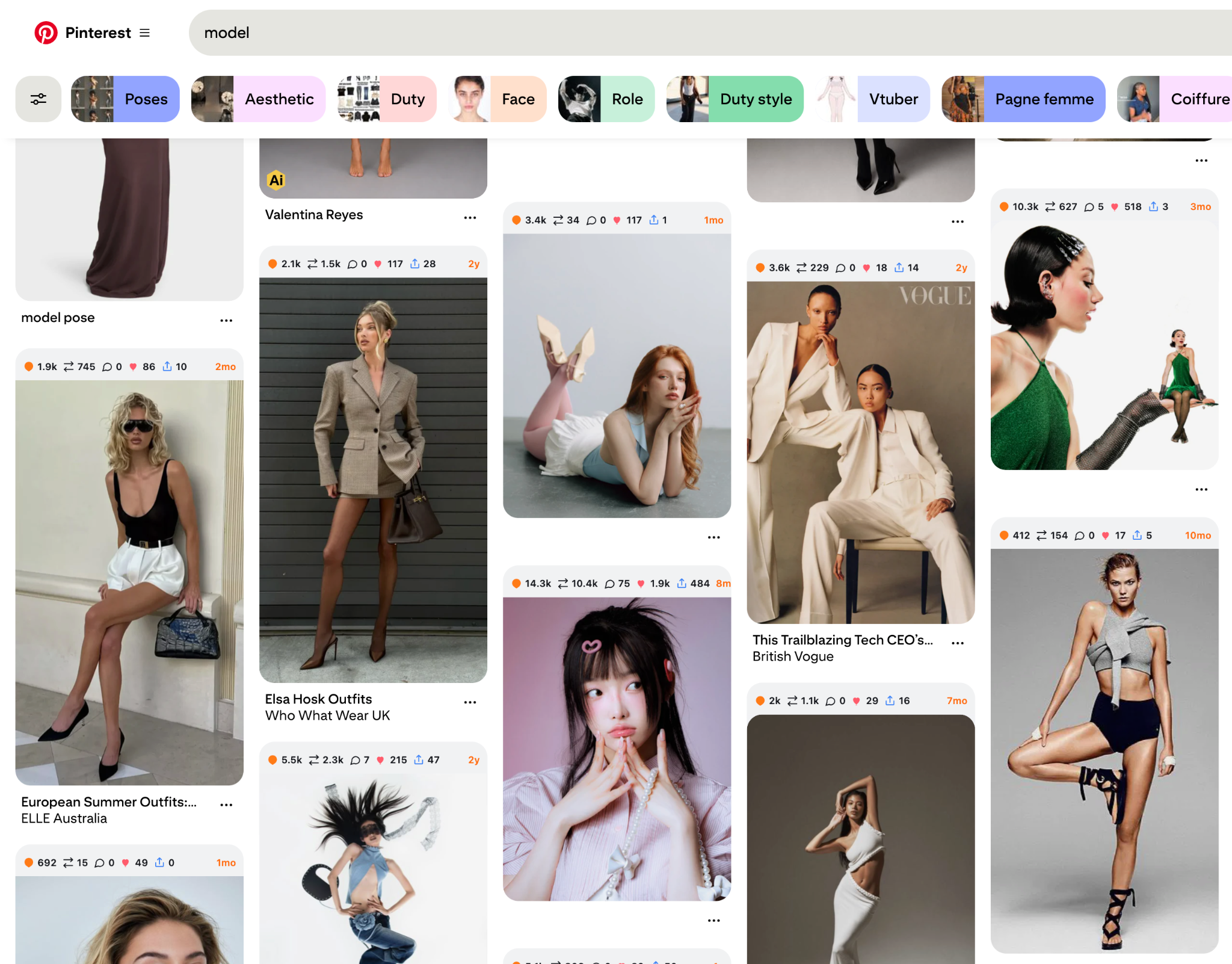
Metric chips above each pin in a light Pinterest feed

Pin Stats Table

Analyze every collected pin

Search the whole collection, choose visible columns, page through results, bookmark what matters and sort by engagement, follower count or creation date.
PIN STATS TABLE ● LOCAL
Total4,241
Bookmarked186
AI412
PINSAVESREPINSAGE
Summer colors14.3K10.4K8m
Editorial poses10.3K6273mo
Minimal portrait5.5K2.3K2y

Illustration of the table layout with sample numbers.

Smart feed controls

Filter the noise while you browse

Hide promoted and AI-generated pins, reveal content Pinterest blurs, switch on dark mode and keep the feed pointed at ideas you can actually use.
The same Pinterest feed in PinWasp dark mode with metric chips

Export

Move clean data into your workflow

Export the complete filtered selection — not just the page on screen — as CSV, JSON or XLSX for research, briefs and client reporting.
EXPORT COLLECTION4,241 PINS

Export the complete current selection

CSVSpreadsheet-ready
JSONFull local record
XLSXFormatted workbook
✓ Images✓ Videos✓ AI labels✓ Engagement

Illustration of the export menu with sample numbers.

Quick controls
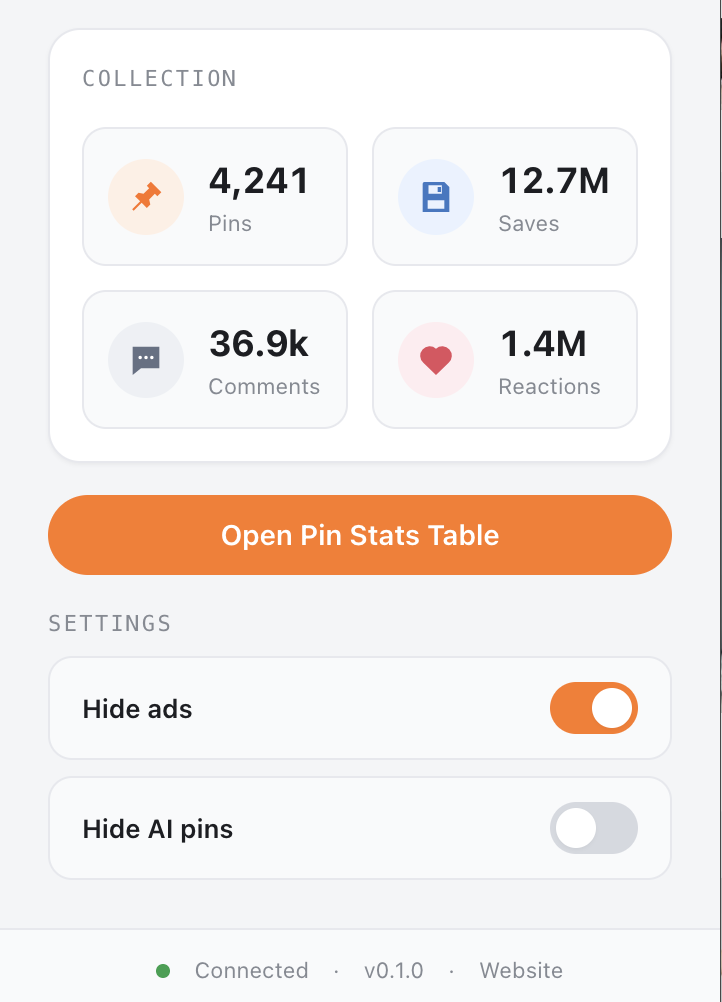
Your collection at a glance

The popup totals every pin you have collected — pins, saves, comments and reactions — so you can size up a niche before opening the table.

Original media

Download the source, not the preview

Save the best available original image or video in one click — from the feed, the grid or the full-size pin page — instead of a downscaled thumbnail.
Download control on a pin in the Pinterest feed

Fullscreen slider

Review media without losing context

Step through pins full-screen with the arrow keys, download what matters and close back to the exact spot in the feed where you started.
Fullscreen slider view over the Pinterest feed
12 / 48

Local-first storage

Keep your research in your browser

Pins, bookmarks, filters and settings live in your browser's own database. The PinWasp backend never receives the collection you build.
LOCAL DATABASE Your pins stay here. IndexedDB • no cloud pin sync

HOW IT WORKS

From scrolling to insight in seconds

No account, no API key, no setup wizard. Install it and the next Pinterest page you open already has the numbers on it.
1

Install PinWasp

Add the Chrome extension. The full 14-day trial starts on its own — no card, no sign-up.

2

Browse Pinterest

Feeds, search results, boards, profiles and pin pages get metric bars automatically as you scroll.

3

Analyze and export

Open the Pin Stats Table to filter and compare, then export the full selection as CSV, JSON or XLSX.

HONEST SCOPE

What PinWasp does — and what it will not do

A research tool is only useful if you know its limits before you pay for it. Here they are.

What it does

Inside your own browser, on pages you open yourself

  • Shows public engagement metrics Pinterest already sends to your browser
  • Marks promoted pins and AI-generated pins with clear badges
  • Stores what you saw locally so you can sort, filter and export it later
  • Downloads the original image or video behind a pin
  • Restyles the feed: dark mode, hidden ads, revealed blurred pins

What it does not do

Deliberate limits, not missing features

  • No access to private boards, secret pins or other people's accounts
  • No auto-pinning, auto-following, mass saving or any other automation of your account
  • No uploading of your collection — the backend only checks your licence
  • No scraping of the whole of Pinterest: it reads the pins you actually scroll past
  • No guarantee of Pinterest's own internal numbers, and no affiliation with Pinterest

PRICING

Simple, Transparent Pricing

Start with the 14-day free trial — no card required. Every plan then includes every feature on up to 3 devices.

Monthly

$5.99/ month
Flexible access, cancel any time.
  • ✓ All PinWasp features
  • ✓ Up to 3 devices
  • ✓ Product updates
  • ✓ Renews monthly until cancelled

Lifetime

$44.99once
One payment, no renewal.
  • ✓ All PinWasp features
  • ✓ Up to 3 devices
  • ✓ Future updates included
  • ✓ Never renews

Prices in USD, excluding any sales tax or VAT, which is calculated at checkout by Lemon Squeezy, our merchant of record. Monthly and annual plans renew automatically until cancelled; lifetime never renews. One licence key activates up to 3 devices. See the Terms of Service and Refunds & Right of Withdrawal.

PINWASP PRINCIPLES

Powerful research without giving up your data

Your Pinterest collection stays in your browser. Read the details in the Privacy Policy.
Local-first

Pins, bookmarks, filters and settings are stored in your browser, not on our servers.

No pin uploads

The backend sees licence checks only — never the pins you collect.

No trackers

No advertising SDK, no analytics tracker in the extension, no cookies on this site.

Focused permissions

The extension runs on Pinterest and talks to our licence endpoint. Nowhere else.

Light + dark

Match Pinterest or follow your system theme.

Built for Chrome

Modern Manifest V3 architecture, updated as Pinterest changes.

READY TO SEE EVERY PIN CLEARLY?

Install PinWasp and turn Pinterest into a research workspace.

See pricing

FAQ

Frequently asked questions

What is PinWasp?

A Chrome extension that adds public Pinterest engagement metrics, feed filters, original-media downloads and analysis tools directly to Pinterest.

What is included in the 14-day free trial?

Every feature, with no account and no payment details. The trial starts by itself when you install the extension.

What happens when the trial ends?

Paid features stop until you activate a licence key. Nothing is charged automatically — there is no card on file — and the pins you already collected stay in your browser.

How many devices can use one licence?

Three activated devices per licence key. You can deactivate a device in the extension's settings to free a slot for another one.

Where is my collected pin data stored?

In your browser's IndexedDB. Pin data is never uploaded to the PinWasp backend, which only receives licence and trial checks. See the Privacy Policy.

Which export formats are supported?

The current filtered selection can be exported as CSV, JSON or XLSX — the whole selection, not only the page on screen.

Can I cancel or get a refund?

Monthly and annual plans can be cancelled at any time from the customer portal linked in your receipt; access runs to the end of the paid period. Statutory withdrawal rights and refunds for faults are set out in the Refund Policy.

Does PinWasp automate my Pinterest account?

No. It never pins, follows, likes or messages for you. It reads what Pinterest already shows on the pages you open and adds information on top.

What if Pinterest changes its website?

Metrics can briefly stop appearing until we ship an update. That risk is why we recommend using the free trial on the pages you actually work with before buying.

Is PinWasp affiliated with Pinterest?

No. PinWasp is an independent product, not affiliated with, endorsed by or sponsored by Pinterest, Inc. You remain responsible for using Pinterest in line with Pinterest's own terms.

SUPPORT & LEGAL

A real person answers, and the rules are in writing

Contact support

Licence problems, refunds, bug reports or a question before buying — write to us and include your order number if you have one.

[SUPPORT_EMAIL]
Your data

What is stored locally, what the licence service receives, how long records are kept and how to exercise your rights.

Read the Privacy Policy
Buying and cancelling

Billing, renewals, the three-device limit, the right of withdrawal and how refunds are handled by our merchant of record.

Refunds & withdrawal